Workflow
Overview
Overview of PyPSA-RSA model architecture

The PyPSA-RSA model consists of four main blocks, the pre-processing, scenario configuration, snakemake workflow and post-processing.
Pre-processing
This stage converts spatial and meteorological data into model-ready inputs. The input data includes GIS data, this is included with the model and may be found in the ‘data/bundle/’ folder. The pypsa-rsa/pre-processing folder includes the jupyter notebook scripts to evaluate the weather and outage profiles. Pre-processed weather file is provided in the data download under the installation page.
Scenario Configuration
In order to make the PyPSA-RSA model accessible to a larger audience than just developers and users who do not know Python, the input data into PyPSA-RSA is entered via Excel spreadsheets to aid with scenario configuration. The spreadsheets are located in the folder pypsa-rsa/scenarios/ME IRP 2024, this folder can be copied to house a users project. In the project folder the global scenario are specified in the excel spreadsheet scenarios_to_run.xlsx. Each row of scenarios_to_run.xlsx is a scenario to run.
wildcard run_scenario True or False simulation_years Years to simulate in the model separated by a comma (2025,2030) regions spatial resolution, options are 1 for single node, 10 node, 34 Eskom supply regions resource_area areas to build new RE capacity, options are redz, corridors or eia line_expansion options fixed_conventionl Eskom, private IPP and RMIPPPP existing generators, characteristics for each scenario are specified in sub_scenarios/fixed_technologies.xlsx in the sheet conventional fixed_renewables REIPPPP existing generators up to BW6 including existing distributed solar PV by province, characteristics for each scenario are specified in sub_scenarios/fixed_technologies.xlsx in the sheet renewables fixed_storage BESIPPP existing and conracted capacity up to BW2, characteristics for each scenario are specified in sub_scenarios/fixed_technologies.xlsx in the sheet storage extendable_techs extendable_max_total scenario for maximum total installed capacity for renewable technologies and conventional ccgt, ocgt and diesel. Specified in sheet max_total_installed of sub_scenarios/extendable_technologies.xlsx extendable_min_total scenario for minimum total installed capacity for renewable technologies and conventional ccgt, ocgt and diesel. Specified in sheet min_total_installed of sub_scenarios/extendable_technologies.xlsx extendable_max_annual scenario for maximum annual build constraints for renewable technologies and conventional ccgt, ocgt and diesel. Specified in sheet max_annual_installed of sub_scenarios/extendable_technologies.xlsx extendable_min_annual scenario for minimum annual build constraints for renewable technologies and conventional ccgt, ocgt and diesel. Specified in sheet min_annual_installed of sub_scenarios/extendable_technologies.xlsx operational_limits includes the cpacity factor, output energy, output power and primary energy for all technologies. Specified in operational_constraints sheet of sub_scenarios/operational_constraints.xlsx outage_profiles planned and unplanned outages per generator for existing and new conventional generators. specified in outage_profiles sheet of sub_scenarios/plant_availability.xlsx annual_availability EAF per generator for all conventional generators. specified in sheet annual_availability sheet of sub_scenarios/plant_availability.xlsx extendable_parameters co2_constraints Carbon constraints specified in sub_scenarios/carbon_constraints.xlsx min_station_hourly Hourly capacity factor for coal specified as a %, 0% corresponding to coal being off in a particular year. Specified in min_station_hrly_cap_fact sheet of sub_scenarios/plant_availability.xlsx load_trajectory annual load specified in TWh/yr. specified in sub_scenarios/annual_load.xlsx reserve_margin specified in sub_scenarios/reserve_margin.xlsx sheet reserve_margin capacity_credits specified in sub_scenarios/reserve_margin.xlsx sheet capacity_credits
The global scenario is defined as a combination of different sub_scenarios for each category of parameters. The following can be specified in sub_scenarios
Snakemake Workflow
The entire execution of the workflow relies on the automated workflow management tool Snakemake that iterates the execution of so-called “rules” in an organized way following the input-output chain.
The Snakefile declares for each python script in the scripts directory a rule which describes which
files the scripts consume and produce (their corresponding input and output files). The snakemake tool
then runs the scripts in the correct order according to the rules’ input/output dependencies. Moreover, it
is able to track, what parts of the workflow have to be regenerated, when a data file or a script is
modified/updated. For example, by executing the following snakemake routine:
.../pypsa-rsa % snakemake -j1 results/'ME IRP 2024'/network/capacity-CNS_G_RB_CB_EAF4.nc
the following workflow is automatically executed.
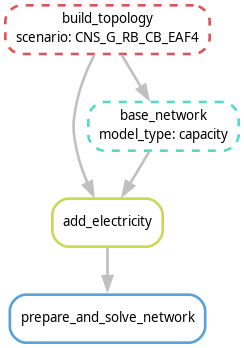
The blocks represent the individual rules which are required to create the file
results/'ME IRP 2024'/network/capacity-CNS_G_RB_CB_EAF4.nc. Each rule requires scripts (e.g. Python)
to convert inputs to outputs. The arrows indicate the outputs from preceding rules which a particular
rule takes as input data.
Note
For reproducibility purposes, the image can be obtained through
snakemake -q --dag results/'ME IRP 2024'/network/capacity-CNS_G_RB_CB_EAF4.nc | sed -n '/^digraph /,$p' | dot -Tpng -o workflow.png
using Graphviz
Post-Processing
execute the optimization for the desired problem, e.g. dispatch, planning, etc.